I used to be a pretty tech savvy person, and I'd like to think that I'm still reasonably so.
For good or for bad, I find myself in the situation where I keep my tech (phone/computers) for much longer than most folks. This is generally great, as the hardware is better, I'm not running out of storage, the speed hasn't slowed down, etc., Why spend lots of money on new tech if you don't need it yet.
The unfortunate side effect, however, comes when the time finally comes, and you find that you're existing technology is so old and outdated that it's problematic to restore your old files to your new tech.
Case in point: I bought a new iPhone 6s yesterday early afternoon. I have been in front of my computer, on the phone with Apple Care ever since, and I have yet to restore my files to my new phone.
Switching from a 3.5 year old iPhone 5 to a iPhone 6s isn't really the problem here. That can be done (or should be able to be done) fairly seamlessly.
The problem here is that my trusty MacBook Pro (St. Jimmy) is well over 5 years old. It has mostly been running well, except for the last year or so it has, on several occasions, had the screen blacked out on me, randomly. Not good, I know.
So basically, I find myself in need of a new phone and a new laptop at the same time. Boo.
The iPhone won out as I find I use it more often than my laptop on a day-to-day basis. I still use my laptop quite a bit, but I don't rely on it like I used to when I had my web design business.
Yesterday, I had a GREAT experience at the Apple store trading in my iPhone 5 and purchasing a new 6s. That'll be another blog post, coming soon.
I didn't leave my house with the intention of getting a new phone, but rather to go to Verizon and then the Apple Store to see what my options were in purchasing a new phone. Because of this, I had synced my iPhone 5 to my iTunes before we left home, but I wasn't as particular about backing up as I may have been if I had known I was about to wipe out and turn in my old phone. Nonetheless, I did have a backup from yesterday morning at 11:01am on my iTunes, so when I decided to buy the new iPhone at the Apple Store, I was fairly confident that the restore would work.
When I came home, I connected my fancy-dancy new phone to my iTunes. Even before it would give me the option to restore from backup, my iTunes told me that in order to connect to this new device, I would need to update to the latest version of iTunes. I thought I had done that recently, so I checked my version of the App, and saw that it was up-to-date. Then, I went to the apple.com site and downloaded what it said was the latest version of iTunes, and saw that it, too, was what I was running.
At this point, I figured it may have something to do with my Operating System on my MacBook Pro. I hate installing new OS systems onto non-native computers, as it generally slows things down and makes problems on older applications.
I called Apple Care, and they confirmed that:
There is a newer version of iTunes that i would need to connect to my new phone, but my laptop's operating system would only allow iTunes to run an older version. This of course means that I had to upgrade to the newest OS for my Mac, which when I tried to do it the first 3 times, crashed my computer!!
After a couple of frustrating hours, we finally got the new OS (El Capitain) on my Mac, and I was also able to download the latest version of iTunes.
Now, while we were spending hours trying to figure this out, the helpful person at Apple Care helped me restore to an older backup of my phone that I had saved to iCLoud in late October, 2015. At that point, I just wanted to be able to use my phone, and figured that all my data up until Oct 2015 was a lot better than nothing at all. This enabled me to use my new phone for a while while my new OS and iTunes were being loaded on my Mac.
Finally, I had my Mac updated, and I was able to connect my new iPhone to iTunes. The first thing I told me was that I now needed to update my OS on my Phone!! That took some doing as well, as now my Mac was freaking out that it had all these new operating systems and apps on it, and it decided to crash on me a few times.
Eventually, I got my iPhone's OS up to date. By this time, by the way, it was around 7:00pm or so.... I had come home from buying my phone around 1:00.
It was finally time to connect my up-to-date phone with my now up-to-date laptop!! We hit the "restore" button from the 11:01am backup session, and it seemed to go well....
...until it crashed 5 minutes in.
Some variation of this happened for the next several hours, each time as the restore process was about 5 minutes in. Sometimes, it would give me a simple error message of "iTunes could not restore the iPhone because an error occurred" (that's helpful), sometimes, it would crash iTunes and need to restart the app, sometimes it would crash my entire computer, and need to restart. Seriously, hours....
I went to bed around 11:30, but was awoken by my cute little kitty at 2:00am. I figured it may as well check in on my computer.
Nope, still crashing.
This morning, still crashing.
Finally, I had a scheduled call from my third apple care rep at 11:00 today. He walked me through something new, which made SO much sense. He said I was having problems because I had already restored a version (from iCloud) to my phone. Instead, he had me wipe my new phone, and start the Restore from scratch.
We are about 30 minutes in on what is estimated to be a 45 minutes restore process right now. Knock on wood, but it hasn't crashed yet.....
Fingers crossed.
UPDATE
YES!!!
After about 55 minutes, my new iPhone6s was able to be restored with my old data! All my contacts, music, and photos are now in my new phone! Yay!!!!
It took just under 24 hours, from start to finish (minus time to eat and sleep!) but it is DONE!!
Kudos to the staff at Apple Care for helping me out and getting my new phone up and running!!
Showing posts with label technology. Show all posts
Showing posts with label technology. Show all posts
Saturday, February 20, 2016

Friday, February 19, 2016
Finally- a new iPhone!!

Kudos to Jimmy for restoring my faith in customer service!!
A multi-part blog post coming soon on:
- My terrible experience at AT&T when they refused to honor a gift card, and why we may switch to Verizon
- Apple Store FTW, and kudos to our guy, Jimmy!
- Oh, the joys of getting new hardware and all the problems that go into restoring all if your old files onto it. (A problem I've been working on all afternoon, and still trying to get through!)
Friday, January 24, 2014
Ooma - Telephone Porting Complete
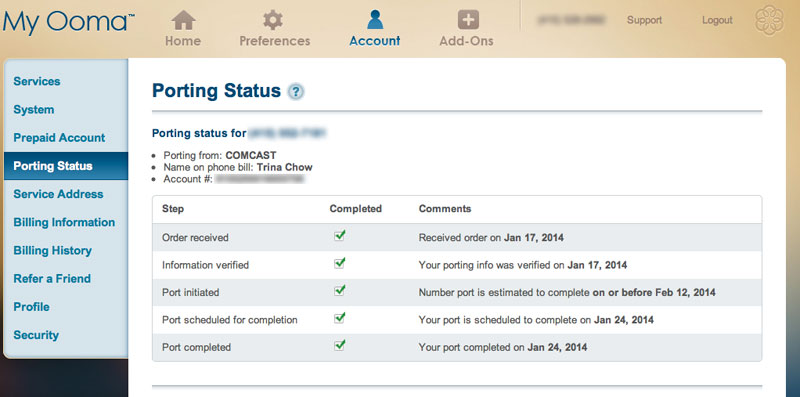
Hurray!
Our old home phone number has been successfully ported to our new telephone service! What does that mean? I get to keep the same home phone number as I've had for the last 18+ years, even with our move up to Washington!
I wrote this blog post about the OOMA Phone Service last week. So far, we are very happy with it. Set up was very easy and fast, and it took less than one week to port the number from our old phone carrier. (their website suggested that it would take 4-6 weeks.) I'm very pleased with how quickly, and smoothly the transition went.
We're also pleased with the quality of the phone reception of the new Ooma service. So far, so good. I'm a fan!
By their suggestion, I'll be waiting a day or so before I cancel our old phone service, but that'll be a nice call to make!
I'm SO happy that we were able to use our old phone number, even while living in a different state. What a cool bit of technology. Bonus: it's much cheaper than what we had been paying before.
update
I just found out that I have a referral code: RAS8552
If you order off their website you'll get $50 off ($99.99 and free shipping) and I'll get $20 account credit. We bought ours off of amazon.com, but this is cheaper.
Wednesday, January 15, 2014
Ooma Phone Service
...and here begins the reviews of new gadgets/electronics that we have bought for the move to our new home.
First up: Ooma Phone Service


We had purchased the Ooma last month, off recommendation of our friend, Andy. We bought it from amazon.com for $127.70.
The idea is that you buy this unit, connect it to your high speed internet, and you only pay applicable taxes and fees. The calls within the US are free, and apparently, there are low International rates as well, which I probably would hardly ever use. I don't love using my cell phone as my only telephone option, and much prefer using a traditional handheld (with a headset, if you must know) while I'm at home on any long-length calls.
So basically, you buy the unit up front, but after that, your phone rates are at a minimum.
One of other main reasons why we bought this is because they also offer a option (for a one-time fee) to port your existing phone number. Meaning, I'm hoping I can retain the home phone number that I've used for the last 18 years in San Francisco. We're going through that process right now (it can take 3-5 weeks to complete that transition) so I'm hoping it'll work. In the meantime, I have a new number.
We only had the chance to set it up two nights ago. The set up was very fast (under 15 minutes, as advertised) and seems to work perfectly so far. The set up was very simple: First you go online to choose a new phone number (and it can be any area code in the US). Next connect your unit to your high speed internet via ethernet, connect unit to your phone, and plug it in. That was pretty much it. I used it for a number of phone calls yesterday, and I'm pleased so far with the voice quality.
Here's hoping we are able to get our old number switched over, and that product continues to work well!
First up: Ooma Phone Service


We had purchased the Ooma last month, off recommendation of our friend, Andy. We bought it from amazon.com for $127.70.
The idea is that you buy this unit, connect it to your high speed internet, and you only pay applicable taxes and fees. The calls within the US are free, and apparently, there are low International rates as well, which I probably would hardly ever use. I don't love using my cell phone as my only telephone option, and much prefer using a traditional handheld (with a headset, if you must know) while I'm at home on any long-length calls.
So basically, you buy the unit up front, but after that, your phone rates are at a minimum.
One of other main reasons why we bought this is because they also offer a option (for a one-time fee) to port your existing phone number. Meaning, I'm hoping I can retain the home phone number that I've used for the last 18 years in San Francisco. We're going through that process right now (it can take 3-5 weeks to complete that transition) so I'm hoping it'll work. In the meantime, I have a new number.
We only had the chance to set it up two nights ago. The set up was very fast (under 15 minutes, as advertised) and seems to work perfectly so far. The set up was very simple: First you go online to choose a new phone number (and it can be any area code in the US). Next connect your unit to your high speed internet via ethernet, connect unit to your phone, and plug it in. That was pretty much it. I used it for a number of phone calls yesterday, and I'm pleased so far with the voice quality.
Here's hoping we are able to get our old number switched over, and that product continues to work well!
Wednesday, August 08, 2012
B of A app for depositing checks

I love it when an app comes out that simplifies your life.
Bank of America's iPhone and iPad app lets deposit a check simply by taking a photo of the front and back of it. This is really handy for me. Since I'm a small business/independent contractor, all of my clients send me checks. I probably have more checks to deposit than most people. Although it's never an issue to go to the bank, sometimes I forget, and it takes me longer to make a deposit than it should. It will also save me time at the ATM: I love that I can deposit them one-by-one to the ATM with their multi-check feature, but it takes a long time when you have a stack of checks.
I know other banks came out with apps capable of this feature before, but I'm really glad that BofA finally caught up!
Wednesday, August 01, 2012
Outlook.com Launch Party
Last night, I attended the outlook.com Launch Party with Dick and some of his work colleagues! It was held at 620 Jones, which is a pretty awesome roof/patio bar/restaurant on Jones Street, in Union Square. They had lots of great food, drinks, and quite a crowd. What a great way for Dick and his team to celebrate the HUGE launch of the product they've been working so hard on for over a year.
A special treat for the evening was the live music: We had an hour concert by "The Lumineers". They were FANTASTIC! What a great band! I was familiar with at least one of their songs "Ho Hey", and really loved the entire set. They were a great live band, and even came into the audience and sang acapella for their last song. Really awesome.
I had a chance meet, reconnect and visit with several of Dick's colleagues on the outlook.com team. Super happy for all of them. It was a big day.
One thing that I quickly learned last night is that Dick uses some of my emails and photos while running his demos at work. How did I learn this? At least 5 or more people that I met last evening told me that they felt like they knew me already from Dick's demos. Funny! I had no idea. Totally fine, of course. Goodness knows, I take enough photos of Dick and talk about him all the time on my blog. :)
It was a great evening of celebration with the outlook.com team. congrats to all involved on a job well done!
... and did I mention that there was an ice cream bar at the end of the evening? :)

Dick and some of the outlook.com team

The Lumineers

So happy together!

The Lumineers come down off the stage to sing one last song

My husband, the rock star!
Here's Dick addressing the crowd at the end of the evening - talking about outlook.com, and thanking everyone for coming
A special treat for the evening was the live music: We had an hour concert by "The Lumineers". They were FANTASTIC! What a great band! I was familiar with at least one of their songs "Ho Hey", and really loved the entire set. They were a great live band, and even came into the audience and sang acapella for their last song. Really awesome.
I had a chance meet, reconnect and visit with several of Dick's colleagues on the outlook.com team. Super happy for all of them. It was a big day.
One thing that I quickly learned last night is that Dick uses some of my emails and photos while running his demos at work. How did I learn this? At least 5 or more people that I met last evening told me that they felt like they knew me already from Dick's demos. Funny! I had no idea. Totally fine, of course. Goodness knows, I take enough photos of Dick and talk about him all the time on my blog. :)
It was a great evening of celebration with the outlook.com team. congrats to all involved on a job well done!
... and did I mention that there was an ice cream bar at the end of the evening? :)

Dick and some of the outlook.com team

The Lumineers

So happy together!

The Lumineers come down off the stage to sing one last song

My husband, the rock star!
Here's Dick addressing the crowd at the end of the evening - talking about outlook.com, and thanking everyone for coming
Tuesday, July 31, 2012
Outlook.com
Congratulations to my hubby, Dick, and his entire team on the launch of the new Outlook.com! They've been working hard on this for a while, and today was a BIG day!!
More info here.
Congrats to the whole Hotmail/Outlook.com team! Great job!!

my new outlook.com screen
More info here.
Congrats to the whole Hotmail/Outlook.com team! Great job!!
my new outlook.com screen
Monday, June 27, 2011
New Speakers & Why I love Groupon
A couple of weeks ago, I received this Groupon Deal. The deal had a photo of a flat screen TV with some cool looking, low profile speakers.
Dick and I had been trying to figure out what to with the speaker system in our main TV room. Our new house came wired for 2 front wall speakers and a low, center speaker. (it also has 2 ceiling speakers for the rear.)
The wall that our TV is on is huge, and frankly, it dwarfed our 46" Samsung LED (which looked quite huge on the wall in our old home). Many of our techie friends who have come over have informed us that we needed a larger TV. :)
The other problem is that the wires for the speakers in the walls are all about 6" off-center for no apparent reason. Very odd. We centered the TV to the un-centered speaker wires, which wasn't really working. Also, we had small, boxy speakers that looked really funny mounted to the wall, so we decided to keep them on stands, and not use the speaker wires in the wall. This worked well enough, so we planned to have a painter come in to stuff the then-unused speaker wires back into the walls, and patch over them.

Our huge wall with our dwarfed TV, and non-centered speaker wires coming out of the wall
Well, procrastination paid off.
When I received the Groupon, I forwarded along the photo to Dick.

the photo that changed everything
Dick loved the look of the speakers in the photo, so we decided to go to the store to check them out. The speakers are by KEF, and are part of the T305 System. We really liked the look of them, and the quality was great.
I hadn't bought the Groupon yet, because we didn't know enough about the product before seeing it. Once we were there and decided to get them, I was able to buy the Groupon right then and there from my phone! We paid $75 for $150 of merchendise. Awesome!!
We decided to install the speakers yesterday. We decided to center the TV to the wall, and have the speaker wires moved over so that they would also be centered correctly. We realized quickly that this is a task that we'll have to hire a pro to do (drill through the walls (drywall on top of plywood, with insulation running between the studs) and fish the wire to the new spot. In the meantime, we mounted the speakers, and draped some of the speaker wires to where they need to be (until they are done properly).
We're super pleased with the result!
The TV size looks much better now - it no longer looks like it's floating in the middle of the wall. It's nicely anchored by the 3 speakers surrounding it. We left enough space between the 3 speakers for a larger TV if we decide to get one. I don't think we need a larger TV now. (Not sure if Dick agrees with that or not!)

The full wall - with properly centered TV and new speakers
The new speakers are GREAT! The low profile looks fantastic, and the sound quality is SO much better than what we had up before.

Profile of the mounted speakers
We still need to have someone help us move the wires to the proper location, but we're really happy with how the new set up looks! I'll try not to procrastinate on having getting the rest of the project finished now. :)

Dick and I had been trying to figure out what to with the speaker system in our main TV room. Our new house came wired for 2 front wall speakers and a low, center speaker. (it also has 2 ceiling speakers for the rear.)
The wall that our TV is on is huge, and frankly, it dwarfed our 46" Samsung LED (which looked quite huge on the wall in our old home). Many of our techie friends who have come over have informed us that we needed a larger TV. :)
The other problem is that the wires for the speakers in the walls are all about 6" off-center for no apparent reason. Very odd. We centered the TV to the un-centered speaker wires, which wasn't really working. Also, we had small, boxy speakers that looked really funny mounted to the wall, so we decided to keep them on stands, and not use the speaker wires in the wall. This worked well enough, so we planned to have a painter come in to stuff the then-unused speaker wires back into the walls, and patch over them.
Our huge wall with our dwarfed TV, and non-centered speaker wires coming out of the wall
Well, procrastination paid off.
When I received the Groupon, I forwarded along the photo to Dick.
the photo that changed everything
Dick loved the look of the speakers in the photo, so we decided to go to the store to check them out. The speakers are by KEF, and are part of the T305 System. We really liked the look of them, and the quality was great.
I hadn't bought the Groupon yet, because we didn't know enough about the product before seeing it. Once we were there and decided to get them, I was able to buy the Groupon right then and there from my phone! We paid $75 for $150 of merchendise. Awesome!!
We decided to install the speakers yesterday. We decided to center the TV to the wall, and have the speaker wires moved over so that they would also be centered correctly. We realized quickly that this is a task that we'll have to hire a pro to do (drill through the walls (drywall on top of plywood, with insulation running between the studs) and fish the wire to the new spot. In the meantime, we mounted the speakers, and draped some of the speaker wires to where they need to be (until they are done properly).
We're super pleased with the result!
The TV size looks much better now - it no longer looks like it's floating in the middle of the wall. It's nicely anchored by the 3 speakers surrounding it. We left enough space between the 3 speakers for a larger TV if we decide to get one. I don't think we need a larger TV now. (Not sure if Dick agrees with that or not!)

The full wall - with properly centered TV and new speakers
The new speakers are GREAT! The low profile looks fantastic, and the sound quality is SO much better than what we had up before.

Profile of the mounted speakers
We still need to have someone help us move the wires to the proper location, but we're really happy with how the new set up looks! I'll try not to procrastinate on having getting the rest of the project finished now. :)

Monday, November 22, 2010
My Beef with Intuit
This is not the best way to start a Monday...
I use Quickbooks for the Mac as my accounting program for my small business. Doesn't everyone?
I don't use it for much more than writing invoices and receiving payments. Pretty basic stuff.
The last time I bought a copy of Quickbooks was (apparently) 3 years ago, when I bought Quickbooks Pro 2007 for the Mac.
I bought a new MacBook Pro a couple of months ago, and ever since then, when I launch Quickbooks, it told me that I need to register my product online and until I do, I have 15 times in which I can access my account. Presumably, after I register it, the 15-uses limitation goes away, and I'm free to use the program that I paid for 3 years ago.
Seems simple enough. (Except for the fact that ALL of my other software programs work just fine on my new mac, and I don't need to re-register ANY of it.)
So, this morning, it seems I was down to my last 8 uses or so. When I clicked to register (Which i've done before) it gave me the error that it was unable to launch the registration application (or something along those lines) then it quit out of my app altogether.
Fine. I'll call Intuit Customer Support, and have them register my app so I an use it again. Not a problem, right?
So, the customer service guy tells me that my version of Quickbooks isn't compatible with my new OS. Mind you, it worked fine over the last few weeks after I couldn't register it - it just opened the app and told me I had X amount of times I could still use it without registering.
Customer service outsouced-from-India-Guy tells me that I'm going to have to upgrade to the latest version - Quickbooks 2011 for the Mac.
The price: $229.00.
Um... excuse me?
First of all, that's the upgrade price (turns out there is no upgrade price - you buy the full software each time you need to "upgrade")?! He then offers me a 20% discount plus will throw in one month technical support.
Fine.
In the meantime, I look up Quickbooks on Amazon.com, and find this review:
owned Quickbooks 2007 for Mac and have used it for years. I am a registered user with Intuit. For the past few months, I got a message that I needed to register the product and that it would be good for only 30 days. This made no sense since I was a registered user and the "register online" option did not work. Finally, one day while I was working, I quit the application and tried to relaunch it. The message came up and would not launch. I called Intuit to help with the registration. I got a tech support in India who had passible English. He confirmed that the product was registered. He asked what system I was using. I was up to date with 10.6.4. He said that was the problem since Quickbooks 2007 was not being supported in 10.6, but only with 10.4 and 10.5. and would not work. I told him that it does work in 10.6 and I have been successful with it for months since upgrading to 10.6. He clarified that it would work only 15 times in 10.6 before the registration would not work. I found this to be incredible. This means that Intuit has written script to make the software not work after 15 times with the newer operating system. In some ways this seems illegal to me. It is one thing to say software is not supported with newer systems, it is another to purposefully make it not work when, in fact, it does work. I use Quickbooks basically as an accounting program and not for creating tax returns. As such, I don't need the most recent version. The tech person further stated that I had to buy the 2011 version and that it, too, would not work after 2014. Again, I'm flabbergasted. Intuit is purposefully making their software not work after a specific period of time. I am livid. I bought the newer version since I had to complete records for a number of clients but felt I was being forced to buy something I did not need due to planned obsolescence.
In general, 2011 seems identical to 2007. I don't need the newer features. I did notice that during reconciliation that often the program added incorrectly.
So, according to this review (and I'm experiencing ALL the same problems) Intuit will make my copy of Quickbooks obsolete after 3 years of using it. I don't think it mattered at all that I just updated my OS - this would have happened in 3 years, regardless. (Yes, I did verify that with service rep guy on the phone).
So, now I'm pissed off. However, I have a lot of stuff on my plate at the moment, so I just roll with the stupid, expensive upgrade.
Here's the thing: like the amazon reviewer above, I only use Quickbooks for two simple functions: invoices and receiving payments. I don't *need* to upgrade every 3 years for additional updates, etc., I am not given a choice, though, if I want to continue using it after 3 years.
The kicker: yes, I get one month free technical support, but after the first month, I will be charged $24.95 AUTOMATICALLY to keep that service going, unless I cancel it before. (Which you bet I'll be doing)
Let's recap:
After 3 years of buying/using this product, I can no longer access my files without "upgrading" for $229.95.
I will also be automatically charged $24.95/month unless I put a note in my calendar to cancel it before the first month is through.
Seems like a huge racket to me.
I admit, I'm playing the game, though. I don't have the time to try to figure out another solution at the moment, and just need for my accounting software to work.
At some point, (after my 3-year lease is up next time) maybe I'll explore other options. Maybe I'll go back to writing my invoices manually in MS Word like I did 15 years ago.
I hate crap like this.
I use Quickbooks for the Mac as my accounting program for my small business. Doesn't everyone?
I don't use it for much more than writing invoices and receiving payments. Pretty basic stuff.
The last time I bought a copy of Quickbooks was (apparently) 3 years ago, when I bought Quickbooks Pro 2007 for the Mac.
I bought a new MacBook Pro a couple of months ago, and ever since then, when I launch Quickbooks, it told me that I need to register my product online and until I do, I have 15 times in which I can access my account. Presumably, after I register it, the 15-uses limitation goes away, and I'm free to use the program that I paid for 3 years ago.
Seems simple enough. (Except for the fact that ALL of my other software programs work just fine on my new mac, and I don't need to re-register ANY of it.)
So, this morning, it seems I was down to my last 8 uses or so. When I clicked to register (Which i've done before) it gave me the error that it was unable to launch the registration application (or something along those lines) then it quit out of my app altogether.
Fine. I'll call Intuit Customer Support, and have them register my app so I an use it again. Not a problem, right?
So, the customer service guy tells me that my version of Quickbooks isn't compatible with my new OS. Mind you, it worked fine over the last few weeks after I couldn't register it - it just opened the app and told me I had X amount of times I could still use it without registering.
Customer service outsouced-from-India-Guy tells me that I'm going to have to upgrade to the latest version - Quickbooks 2011 for the Mac.
The price: $229.00.
Um... excuse me?
First of all, that's the upgrade price (turns out there is no upgrade price - you buy the full software each time you need to "upgrade")?! He then offers me a 20% discount plus will throw in one month technical support.
Fine.
In the meantime, I look up Quickbooks on Amazon.com, and find this review:
owned Quickbooks 2007 for Mac and have used it for years. I am a registered user with Intuit. For the past few months, I got a message that I needed to register the product and that it would be good for only 30 days. This made no sense since I was a registered user and the "register online" option did not work. Finally, one day while I was working, I quit the application and tried to relaunch it. The message came up and would not launch. I called Intuit to help with the registration. I got a tech support in India who had passible English. He confirmed that the product was registered. He asked what system I was using. I was up to date with 10.6.4. He said that was the problem since Quickbooks 2007 was not being supported in 10.6, but only with 10.4 and 10.5. and would not work. I told him that it does work in 10.6 and I have been successful with it for months since upgrading to 10.6. He clarified that it would work only 15 times in 10.6 before the registration would not work. I found this to be incredible. This means that Intuit has written script to make the software not work after 15 times with the newer operating system. In some ways this seems illegal to me. It is one thing to say software is not supported with newer systems, it is another to purposefully make it not work when, in fact, it does work. I use Quickbooks basically as an accounting program and not for creating tax returns. As such, I don't need the most recent version. The tech person further stated that I had to buy the 2011 version and that it, too, would not work after 2014. Again, I'm flabbergasted. Intuit is purposefully making their software not work after a specific period of time. I am livid. I bought the newer version since I had to complete records for a number of clients but felt I was being forced to buy something I did not need due to planned obsolescence.
In general, 2011 seems identical to 2007. I don't need the newer features. I did notice that during reconciliation that often the program added incorrectly.
So, according to this review (and I'm experiencing ALL the same problems) Intuit will make my copy of Quickbooks obsolete after 3 years of using it. I don't think it mattered at all that I just updated my OS - this would have happened in 3 years, regardless. (Yes, I did verify that with service rep guy on the phone).
So, now I'm pissed off. However, I have a lot of stuff on my plate at the moment, so I just roll with the stupid, expensive upgrade.
Here's the thing: like the amazon reviewer above, I only use Quickbooks for two simple functions: invoices and receiving payments. I don't *need* to upgrade every 3 years for additional updates, etc., I am not given a choice, though, if I want to continue using it after 3 years.
The kicker: yes, I get one month free technical support, but after the first month, I will be charged $24.95 AUTOMATICALLY to keep that service going, unless I cancel it before. (Which you bet I'll be doing)
Let's recap:
After 3 years of buying/using this product, I can no longer access my files without "upgrading" for $229.95.
I will also be automatically charged $24.95/month unless I put a note in my calendar to cancel it before the first month is through.
Seems like a huge racket to me.
I admit, I'm playing the game, though. I don't have the time to try to figure out another solution at the moment, and just need for my accounting software to work.
At some point, (after my 3-year lease is up next time) maybe I'll explore other options. Maybe I'll go back to writing my invoices manually in MS Word like I did 15 years ago.
I hate crap like this.
Saturday, July 24, 2010
Facetime!

David & Miguel on Facetime!
David is the proud new owner of an iPhone 4.
I called him using Facetime (video calling) this morning. It was his first Facetime call. Fun!!
He brought Miguel in on the call, and I walked the conversation downstairs to where Dick was playing piano.
Update
David just posted this picture up on Facebook. Here's the same conversation from his point of view. :)

Trina & Dick on Facetime!
It's cool how it automatically flips the image for the receiver. David's photo shows our room as it actually is, whereas the thumbnail of me and Dick in our photo (above) shows the mirror-image (as we see it on the camera).
David's photo also shows that I'm still in my jammies and robe at 11:00am on a Saturday. :)
Thursday, July 22, 2010
Bumper
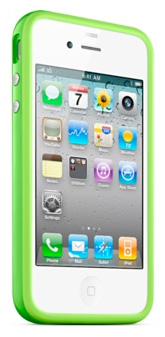
Green Bumper (my phone is black, instead of the white phone pictured here)
I've had my iPhone 4 for four weeks now. When I bought it at the Apple Store, I asked to see if they had any cases available. They only had one at the time, an off-brand that I didn't recognize, in a style that I didn't much care for.
I knew I'd want a case ASAP, as I remember that I always thought my old phone was a little too slip-prone without one.
Dick was up in Seattle at the time, and told me that several of his friends up there had bought the Bumper case by Apple. He said it was a fine case, and thought I would like it.
That weekend, I called around to all of the local Apple Stores in my area, and none of them had any bumpers in stock. I figured it would be just as easy at this point to just order one online through Apple.
I ordered the lime green bumper. At the time that I ordered it (June 27th) it wasn't expected to be shipped until July 16th. That was too bad, as I had two trips planned before then, but I figured I'd just wait it out, and try my best not to drop my phone.
Well, of course the phone was delivered while I was out of town. I just picked it up from Fed Ex today.
The bumper is actually more substantial than I had expected, which is a good thing. It certainly helps with the general grippiness - I don't feel like it's going to slip out of my hand now.
It also makes a difference with the reception. Now I don't have to worry about holding my phone "the wrong way". (thanks, Steve)
While I was away last week, it was announced that Apple will reimburse any customer who buys a bumper for their phone - their solution to the antenna problem.
I'm really glad that I placed my order when I did. When I went to the Apple site today, I noticed (not surprisingly) that all colors/models of the iPhone 4 bumpers are currently unavailable. I imagine they are going to be quite popular items for a while.
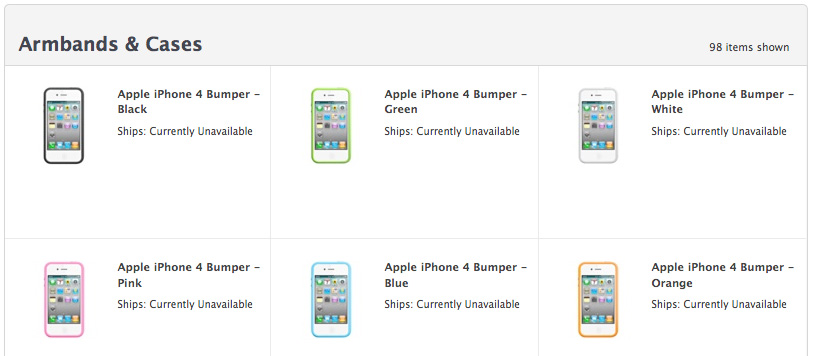
Currently Unavailable
UPDATE
Just received this email
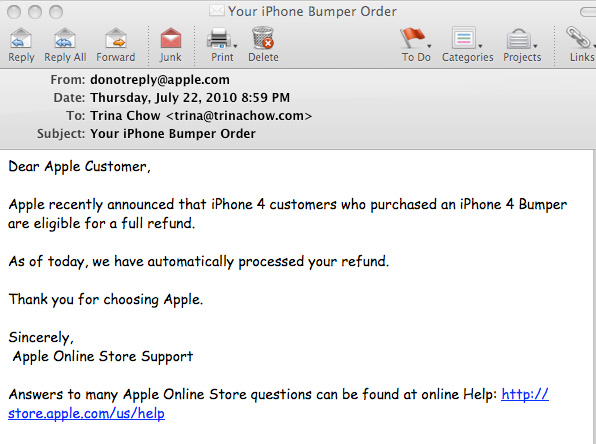
How convenient. :)
Tuesday, June 15, 2010
New iPhone Ordered
I bought my iPhone on July 7, 2007.
Since then, most of my friends have upgraded to newer versions, but I stuck with my trusty-rusty original for almost 3 years. I bought it a week after it was released, when the cost was still a whopping $600.00. I wasn't going to spend any more money on a new phone until I felt like I really got my money's worth out of it! :)
So, three years later, and I'm ready to make the leap.
It's time to upgrade.
Thankfully, the price of the new iPhones are significantly lower than they were 3 years ago!
I placed my reservation this morning. I'll be able to pick up my new phone from my local Apple Store next Thursday.
Originally, I tried to buy/reserve my phone online on the apple.com site. That didn't go well. It kept timing out and having errors.
I then followed Omar's advice, and downloaded the Apple Store App onto my iPhone and was able to complete my reservation process smoothly within a minute or two. Good tip, Omar!
I just got my email confirmation from Apple.
It all looks good.... except... well, look at the price!
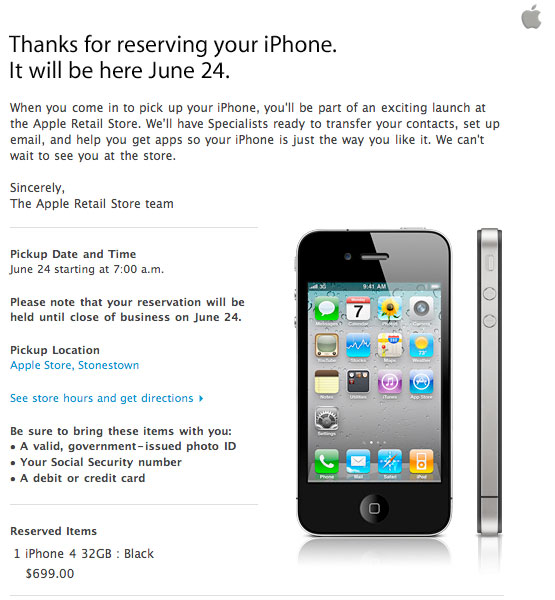
$699.99?
Um, that's supposed to be $299.99.
LOL.
I'm sure it'll be fine, but what an odd little bug!
Since then, most of my friends have upgraded to newer versions, but I stuck with my trusty-rusty original for almost 3 years. I bought it a week after it was released, when the cost was still a whopping $600.00. I wasn't going to spend any more money on a new phone until I felt like I really got my money's worth out of it! :)
So, three years later, and I'm ready to make the leap.
It's time to upgrade.
Thankfully, the price of the new iPhones are significantly lower than they were 3 years ago!
I placed my reservation this morning. I'll be able to pick up my new phone from my local Apple Store next Thursday.
Originally, I tried to buy/reserve my phone online on the apple.com site. That didn't go well. It kept timing out and having errors.
I then followed Omar's advice, and downloaded the Apple Store App onto my iPhone and was able to complete my reservation process smoothly within a minute or two. Good tip, Omar!
I just got my email confirmation from Apple.
It all looks good.... except... well, look at the price!
$699.99?
Um, that's supposed to be $299.99.
LOL.
I'm sure it'll be fine, but what an odd little bug!
Sunday, January 31, 2010
A New Washer and Dryer!
very exciting!!

Pretty new Washer & Dryer
At last! We bought a new washer and dryer yesterday, and it was delivered (amazingly enough) this morning!
The old washer and dryer were probably well over 25 years. They were here when I bought my condo from Andrew in 1998, and they were here when he bought the condo in 1988. They were still both working fine, so I figured I'd wait until one of broke before we bought a new one.
I mentioned this to my Mom a few weeks ago, and she reminded me how much more energy and water efficient the new models are.
right...
I mentioned the same thing to Andrew, and he cautioned me, warning that I may not want to wait until one of them breaks. What if one of them broke, and it went terribly wrong? Worst case scenario: Our washer and dryer are on the top floor. What if the washer broke, and caused a leak (or flood). Bad news.
So, suddenly, I was on a quest for a new washer and dryer.
I asked my friends on Facebook for recommendations, and got a lot of good advice.
We ended up getting the Samsung 4.5 cu. ft. front load steam washer and dryer. I think we got the Mother of All Washing Machines. ;) It's HUGE (my old washer had a 3.2 cu. ft. capacity, I think) and the controls and functionality are all so cool. Washer and Dryer technology sure has come a long way over the past 25+ years!
We decided on getting white machines, versus the stainless steel. I generally prefer stainless steel for appliances, but decided on white for these because a) stainless steel is harder than traditional paint, and is hard to clean and accumulates lots of finger prints, and b) it was about $100 more expensive per machine. We had also looked at and considered the LG models, which had some fabulous colors that I really loved (candy red, colbalt blue) but since we went with the Samsung, it was only white or stainless steel.
We got a really great deal at Sears. Dick and I really enjoy buying large appliances from Sears - their sales people are always so knowledgeable and friendly, and their prices are hard to beat. I did some online research last week and saw that they were having a 10-20% off sale on all major appliances through this weekend, so I really wanted to make sure that we went this weekend to check it out. We went yesterday morning. As it turns out, they were having a One-day only sale yesterday which gave us an additional 10% off! Score!
Another nice surprise was that they were in stock, and were available for delivery as early as today! Nice! They were delivered this morning at 10:00am, which gave me an entire day to wash everything I could think of to test 'em out!
The delivery guys were pretty amazing. First they took the old washer and dryer out, then brought the new ones in and set them up. All within 30-40 minutes! They had these very clever straps that wrapped over their shoulders, and underneath the machines, which they just lifted and carried down the stairs and out the door. Very impressive.

Out with the old, and in with the new!
What amazes me most (so far) about the new washer and dryer are how very quiet they are. With the old machines, I could hear them from my office (same floor, but on the other side of the house) and even worse: the entire room/house would shake/vibrate whenever the washer was going through the spin cycle. With the new washer and dryer, I don't hear a thing, and I can be in the same room and not feel the spin cycle. Amazing!
So, clearly, I'm a fan so far, and super happy with my new washer an dryer. We'll see how it all continues to go...

Pretty new Washer & Dryer
At last! We bought a new washer and dryer yesterday, and it was delivered (amazingly enough) this morning!
The old washer and dryer were probably well over 25 years. They were here when I bought my condo from Andrew in 1998, and they were here when he bought the condo in 1988. They were still both working fine, so I figured I'd wait until one of broke before we bought a new one.
I mentioned this to my Mom a few weeks ago, and she reminded me how much more energy and water efficient the new models are.
right...
I mentioned the same thing to Andrew, and he cautioned me, warning that I may not want to wait until one of them breaks. What if one of them broke, and it went terribly wrong? Worst case scenario: Our washer and dryer are on the top floor. What if the washer broke, and caused a leak (or flood). Bad news.
So, suddenly, I was on a quest for a new washer and dryer.
I asked my friends on Facebook for recommendations, and got a lot of good advice.
We ended up getting the Samsung 4.5 cu. ft. front load steam washer and dryer. I think we got the Mother of All Washing Machines. ;) It's HUGE (my old washer had a 3.2 cu. ft. capacity, I think) and the controls and functionality are all so cool. Washer and Dryer technology sure has come a long way over the past 25+ years!
We decided on getting white machines, versus the stainless steel. I generally prefer stainless steel for appliances, but decided on white for these because a) stainless steel is harder than traditional paint, and is hard to clean and accumulates lots of finger prints, and b) it was about $100 more expensive per machine. We had also looked at and considered the LG models, which had some fabulous colors that I really loved (candy red, colbalt blue) but since we went with the Samsung, it was only white or stainless steel.
We got a really great deal at Sears. Dick and I really enjoy buying large appliances from Sears - their sales people are always so knowledgeable and friendly, and their prices are hard to beat. I did some online research last week and saw that they were having a 10-20% off sale on all major appliances through this weekend, so I really wanted to make sure that we went this weekend to check it out. We went yesterday morning. As it turns out, they were having a One-day only sale yesterday which gave us an additional 10% off! Score!
Another nice surprise was that they were in stock, and were available for delivery as early as today! Nice! They were delivered this morning at 10:00am, which gave me an entire day to wash everything I could think of to test 'em out!
The delivery guys were pretty amazing. First they took the old washer and dryer out, then brought the new ones in and set them up. All within 30-40 minutes! They had these very clever straps that wrapped over their shoulders, and underneath the machines, which they just lifted and carried down the stairs and out the door. Very impressive.

Out with the old, and in with the new!
What amazes me most (so far) about the new washer and dryer are how very quiet they are. With the old machines, I could hear them from my office (same floor, but on the other side of the house) and even worse: the entire room/house would shake/vibrate whenever the washer was going through the spin cycle. With the new washer and dryer, I don't hear a thing, and I can be in the same room and not feel the spin cycle. Amazing!
So, clearly, I'm a fan so far, and super happy with my new washer an dryer. We'll see how it all continues to go...
Wednesday, January 27, 2010
"The iPad" - Really? That's the best name you could come up with?
worst. product. name. ever...
iPad?
Really?
This just goes to show that sometimes all of those brilliant engineers and marketing specialists just don't see the whole picture.
I'm pretty sure you could ask any woman on the street what the first thing she would think of when hearing about a product named "iPad", and she would say: feminine hygiene product.
I can guarantee you that (at least before Apple's announcement this morning) no woman who hears of a product called "iPad" would think, "Fantastic, computer gadget! I must get one now!"
No. that's not how it works.
Just say the word "pad" and our minds go elsewhere - somewhere much less fun and exciting.
I haven't even looked into the new iPad yet. I still can't get past the name.
But I'll tell you this, seeing the headline that Steve Jobs calls the iPad “truly magical” and a “revolutionary device” has a whole new set of connotations for me now. :)
Note to Apple: make sure you include smart women into those important meetings when you name those new "must-have devices"!
It just may stop you from sounding like an imbecile.
"The New iPad! Now with wings!"
update
No surprise: the net has been buzzing with iPad jokes all day.
Here's just one article about Apple's big goof:
Apple's iPad becomes big fat ‘intimate’ joke
iPad?
Really?
This just goes to show that sometimes all of those brilliant engineers and marketing specialists just don't see the whole picture.
I'm pretty sure you could ask any woman on the street what the first thing she would think of when hearing about a product named "iPad", and she would say: feminine hygiene product.
I can guarantee you that (at least before Apple's announcement this morning) no woman who hears of a product called "iPad" would think, "Fantastic, computer gadget! I must get one now!"
No. that's not how it works.
Just say the word "pad" and our minds go elsewhere - somewhere much less fun and exciting.
I haven't even looked into the new iPad yet. I still can't get past the name.
But I'll tell you this, seeing the headline that Steve Jobs calls the iPad “truly magical” and a “revolutionary device” has a whole new set of connotations for me now. :)
Note to Apple: make sure you include smart women into those important meetings when you name those new "must-have devices"!
It just may stop you from sounding like an imbecile.
"The New iPad! Now with wings!"
update
No surprise: the net has been buzzing with iPad jokes all day.
Here's just one article about Apple's big goof:
Apple's iPad becomes big fat ‘intimate’ joke
Sunday, November 22, 2009
Gift Exchange Name Generator
At last! I've been looking for something like this for the last couple of years.
I believe that both my family as well as Dick's family plan on drawing names for our Christmas gift exchange this year.
In the past, we drawn names out of a hat, but that doesn't always work because sometimes someone draws the name of an immediate family member that they were already planning to buy a gift for.
Today, I did a search on Bing, and came up with this:
Free Name Drawing Utility
It's fantastic, and very easy:
Step 1: type in all of the names of the people involved
Step 2: Add Constraints (you can lay out rules or constraints for individuals who shouldn't buy for each other)
Step 3: the list is generated!
Handy Dandy!
I believe that both my family as well as Dick's family plan on drawing names for our Christmas gift exchange this year.
In the past, we drawn names out of a hat, but that doesn't always work because sometimes someone draws the name of an immediate family member that they were already planning to buy a gift for.
Today, I did a search on Bing, and came up with this:
Free Name Drawing Utility
It's fantastic, and very easy:
Step 1: type in all of the names of the people involved
Step 2: Add Constraints (you can lay out rules or constraints for individuals who shouldn't buy for each other)
Step 3: the list is generated!
Handy Dandy!
Monday, June 01, 2009
My Cabana: the Recording Studio
My Cousin, Reverend Bruce Reyes-Chow, Moderator of the General Assembly of the Presbyterian Church (U.S.A.), sent me an email last night asking if he could come over early this morning. He had a meeting at his girls' school (close to my house) early this morning, and needed a quiet place nearby where he could connect to the internet to do his weekly blog/radio podcast.
I figured the best place to put him would be my cabana/studio/shed out in the backyard. It's quiet, separate from the house, and has WiFi.
He came over at 8:30 this morning, and we got him all set up in the cabana for his show.
It starts at 9:00am.
You can listen to it here.
...streaming to you live, from the cabana...
I figured the best place to put him would be my cabana/studio/shed out in the backyard. It's quiet, separate from the house, and has WiFi.
He came over at 8:30 this morning, and we got him all set up in the cabana for his show.
It starts at 9:00am.
You can listen to it here.
...streaming to you live, from the cabana...
Thursday, May 14, 2009
Is this because I said that I wouldn't drink the Kook-Aid?
Oh, come on! How many Mac problems am I supposed to have in one week?
Ugh.
Has anyone else had this problem?
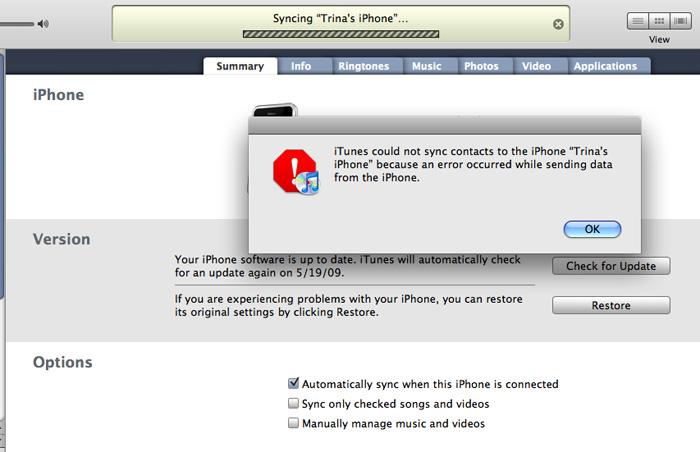
karma?
update
Well, that wasn't so bad.
found this article online, and tried the following fix:
I opened iSync in the Applications folder. (You can find that by clicking on the Finder, usually to the far left of the dock/toolbar at the bottom of the screen.) Then I went to the top of the screen and clicked "iSync", then "Preferences" then Reset Sync History. This totally solved the problem.
Ugh.
Has anyone else had this problem?
karma?
update
Well, that wasn't so bad.
found this article online, and tried the following fix:
I opened iSync in the Applications folder. (You can find that by clicking on the Finder, usually to the far left of the dock/toolbar at the bottom of the screen.) Then I went to the top of the screen and clicked "iSync", then "Preferences" then Reset Sync History. This totally solved the problem.
"Hi, I'm a Mac, but here's one of the things that Apple doesn't tell you about..."
So, yes, I am a Mac. I've been using the Mac since 1984, and I've never owned a PC.
I'm a huge fan of Apple products in general.
With that said, I love my Mac, but I refuse to drink the Kool-Aid.
Over the years, I've learned that not all things Apple vs. PC are black and white. This probably has a lot to do with me becoming a little more open-minded and educated about the world of PCs from my hubby, who used to work at Apple, worked on Mac products for several years, is still a fan, but (gasp) has been using a PC for several years now.
Let's set the record straight:
Not all Macs/Apple products are fail safe, and without problems
and...
PCs are not the evil entities that they are sometimes made out to be.
It's just not that simple.
Case in point: I'm on my third Mac laptop. I had a Powerbook (Wallstreet) that I bought in 1999, G3 Powerbook that I bought in 2003, and my current MacBook Pro that I've had since June 2007.
This last MacBook Pro has had it's fair share of problems (which have all been documented on this blog). I've had to bring it in twice to have the hard drive restored, had the battery replaced, and needed two new logic boards.
I just got it back two days ago with the newest logic board.
Good news: it seems to be much faster now, which is fantastic, and the monitor issues have been fixed.
Bad news: (and here's what Apple doesn't tell you...)
When you've been using Apple's Time Machine to back up your computer routinely, but you need to send you computer in for a new logic board, when you get your computer back, it doesn't recognize your old Time Machine files.
Not that this is a huge deal. The easy solution is that you just wipe out your old Time Machine back ups, and start fresh. Meh.
But, isn't that what Apple and Time Machine are all about? Ease of use.
The problem with Time Machine is that it's so simple that it's very limited on what you're actually able to control. Basically, you can turn it off or on, and you can specify the location of the external drive that you want to back up to. Pretty limited.
Anyhow, I called Apple Support to see if there was some way that they could help me find some hidden settings somewhere in my preferences to link my computer back to my old Time Machine Files.
The first person I spoke to was very nice, and helpful in the sense that she passed me along to another person who was more of an expert in such things. He admitted that this is an ongoing problem, and that in all of the cases that he's had, he's never been able to successfully walk a person through the process over the phone. It's just too complicated. Why? because it involves opening a terminal window, and doing a bunch of UNIX programming to sort things out.
Many moons ago, I worked at Sun Microsystems and learned the very basics of UNIX. Probably not enough to get me through this, though.
He offered to find a computer repair store in my city where I could bring my computer and my external drive, and they could fix it relatively quickly for a small fee. Hmmm.. I asked why I couldn't go to the Genius Bar at an Apple store, and he said that I could, but that it would take a lot longer to get in, and the people helping me may or may not be able to complete this successfully.
Now, luckily, I just happen to live with one of the most brilliant computer scientists I've ever met, and he has plenty of experience in many computer languages, including UNIX. I told the Apple Care rep this, and he suggested that Dick do a google search to find some instructions on how to solve this problem using UNIX.
So, we did just that. Dick found this helpful site:
10.5: Repair Time Machine after logic board changes, read the instructions, took many notes, typed in a lot of code, and eventually got it all up and running.
For the record, I took a screen shot of the UNIX code that he wrote. Not that I expect anyone to read or understand it, but I wanted to point out how incredibly difficult this would be for the average Joe Mac User to be able to pull this off.
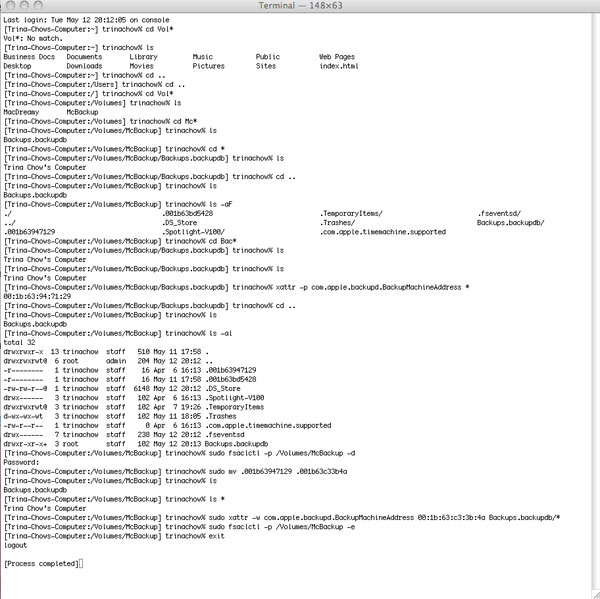
UNIX gobbily gook
If Apple/Mac is always tooting about how simple their products are supposed to be, how is it that this is the second time I've had this problem in just over a year? And, even if it's a complete fluke that I had to have a logic board replaced, why is it so difficult to point my computer back to my Time Machine files so that I can have access to my back up files again?
Don't believe the hype.
No computer brand is trouble free.
There are no perfect computers manufacturers.
There are no evil computer manufacturers.
Companies make computers, and they all have issues.
I'm a huge fan of Apple products in general.
With that said, I love my Mac, but I refuse to drink the Kool-Aid.
Over the years, I've learned that not all things Apple vs. PC are black and white. This probably has a lot to do with me becoming a little more open-minded and educated about the world of PCs from my hubby, who used to work at Apple, worked on Mac products for several years, is still a fan, but (gasp) has been using a PC for several years now.
Let's set the record straight:
Not all Macs/Apple products are fail safe, and without problems
and...
PCs are not the evil entities that they are sometimes made out to be.
It's just not that simple.
Case in point: I'm on my third Mac laptop. I had a Powerbook (Wallstreet) that I bought in 1999, G3 Powerbook that I bought in 2003, and my current MacBook Pro that I've had since June 2007.
This last MacBook Pro has had it's fair share of problems (which have all been documented on this blog). I've had to bring it in twice to have the hard drive restored, had the battery replaced, and needed two new logic boards.
I just got it back two days ago with the newest logic board.
Good news: it seems to be much faster now, which is fantastic, and the monitor issues have been fixed.
Bad news: (and here's what Apple doesn't tell you...)
When you've been using Apple's Time Machine to back up your computer routinely, but you need to send you computer in for a new logic board, when you get your computer back, it doesn't recognize your old Time Machine files.
Not that this is a huge deal. The easy solution is that you just wipe out your old Time Machine back ups, and start fresh. Meh.
But, isn't that what Apple and Time Machine are all about? Ease of use.
The problem with Time Machine is that it's so simple that it's very limited on what you're actually able to control. Basically, you can turn it off or on, and you can specify the location of the external drive that you want to back up to. Pretty limited.
Anyhow, I called Apple Support to see if there was some way that they could help me find some hidden settings somewhere in my preferences to link my computer back to my old Time Machine Files.
The first person I spoke to was very nice, and helpful in the sense that she passed me along to another person who was more of an expert in such things. He admitted that this is an ongoing problem, and that in all of the cases that he's had, he's never been able to successfully walk a person through the process over the phone. It's just too complicated. Why? because it involves opening a terminal window, and doing a bunch of UNIX programming to sort things out.
Many moons ago, I worked at Sun Microsystems and learned the very basics of UNIX. Probably not enough to get me through this, though.
He offered to find a computer repair store in my city where I could bring my computer and my external drive, and they could fix it relatively quickly for a small fee. Hmmm.. I asked why I couldn't go to the Genius Bar at an Apple store, and he said that I could, but that it would take a lot longer to get in, and the people helping me may or may not be able to complete this successfully.
Now, luckily, I just happen to live with one of the most brilliant computer scientists I've ever met, and he has plenty of experience in many computer languages, including UNIX. I told the Apple Care rep this, and he suggested that Dick do a google search to find some instructions on how to solve this problem using UNIX.
So, we did just that. Dick found this helpful site:
10.5: Repair Time Machine after logic board changes, read the instructions, took many notes, typed in a lot of code, and eventually got it all up and running.
For the record, I took a screen shot of the UNIX code that he wrote. Not that I expect anyone to read or understand it, but I wanted to point out how incredibly difficult this would be for the average Joe Mac User to be able to pull this off.
UNIX gobbily gook
If Apple/Mac is always tooting about how simple their products are supposed to be, how is it that this is the second time I've had this problem in just over a year? And, even if it's a complete fluke that I had to have a logic board replaced, why is it so difficult to point my computer back to my Time Machine files so that I can have access to my back up files again?
Don't believe the hype.
No computer brand is trouble free.
There are no perfect computers manufacturers.
There are no evil computer manufacturers.
Companies make computers, and they all have issues.
Wednesday, May 06, 2009
MacLemon

Good Grief.
This is what a diagnosis test result looks like when you have a bad video chip, and you have to replace the entire logic board, which had already been replaced a year ago.
I have AppleCare, but it's still going to take 3-6 days to be repaired.
I am just about ready to toss this computer out the window.
Saturday, April 04, 2009
Well, Frack. This can't be good
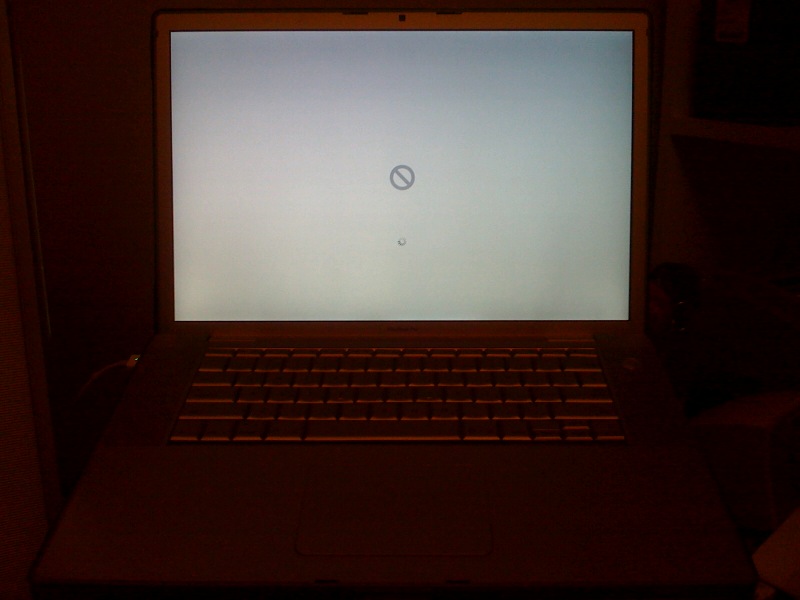
Hmph.
Subscribe to:
Posts (Atom)